SSH Launcher
CompletedA PowerShell + WPF desktop launcher that reads ~/.ssh/config directly, live-checks host reachability, and opens SSH sessions on double-click.
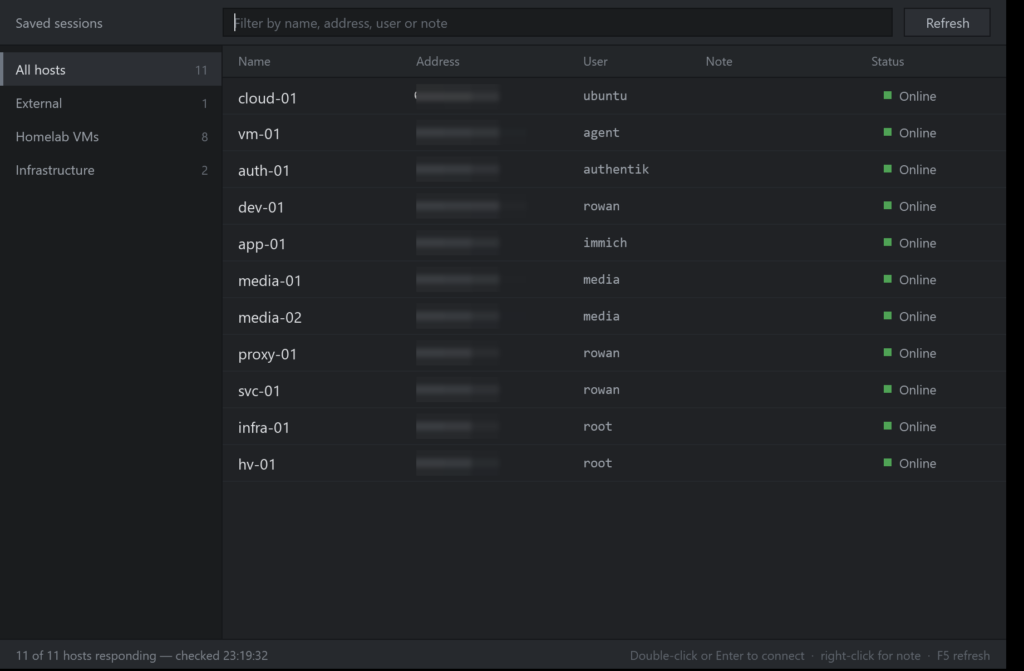
A small Windows desktop launcher for SSH, written in PowerShell + WPF. It reads ~/.ssh/config directly as its single source of truth, live-checks whether each host is reachable, and opens a session on double-click — so connecting to any box in the lab is two keystrokes instead of remembering an alias and typing it out.
Why I built it
Once the homelab grew past a handful of VMs, I was constantly re-typing ssh commands and half-remembering which alias pointed where. Existing GUI clients wanted their own separate host list, which immediately drifts out of sync with the config file that actually governs how connections are made. I wanted a launcher that owned no state of its own.
What it does
- Parses
~/.ssh/configon every refresh — aliases, hostnames and users come straight from the file, with wildcard entries filtered out. - Auto-groups hosts into Local network / External by RFC1918 range, with optional user-defined regex rules in
launcher-groups.json. - Live reachability check per host with a coloured status dot and an “n of n hosts responding” summary.
- Instant filter across name, address, user and note.
- Per-host notes stored in
~/.ssh/launcher-meta.json— right-click to annotate what a box actually does. - Double-click or Enter to connect; F5 to re-scan.
How it’s built
- PowerShell 5.1 driving a WPF interface via
PresentationFramework— no runtime to install on a Windows box. - A small C# launcher shim compiled to
SshLauncher.exe, so it starts from a pinned taskbar shortcut with its own icon and no console window. - Zero configuration to get started: no host list to maintain, no credentials stored by the app — authentication stays with the SSH agent and key material never leaves
~/.ssh. - Six UI variants were mocked up and rendered side-by-side before settling on the final dense table layout.
Security notes
- The tool stores no credentials. It shells out to the system
sshclient, so key-based auth, agent forwarding policy andknown_hostsverification all behave exactly as configured. - Notes are kept separate from the SSH config so the config file is never rewritten by the app.
- Addresses in the screenshot are internal lab ranges; the public-facing host has been redacted.